A CSR (Certificate Signing Request) is a block of text that you create and send to the certificate authority to get a paid SSL certificate. It contains your domain, company details and the public key.
In short
- A private key is created together with the CSR; keep it safe.
- With Let's Encrypt you do not need a CSR; Plesk does everything automatically.
What does a CSR contain?
| Field | Example |
|---|---|
| Domain (CN) | yourdomain.com; for a wildcard *.yourdomain.com |
| Organisation (O) | Your Company Ltd. (can be left empty for DV) |
| City / Country | London / GB |
| Key size | 2048 bits (standard) |
How do I create a CSR?
If your site is on webevi hosting, the easiest way is Plesk: How do I create a CSR in Plesk? The panel keeps the private key for you.
For another server you can use our free CSR Generator:
- Open the CSR Generator page.
- Enter the domain, organisation, city, country and email; leave the key size at 2048.
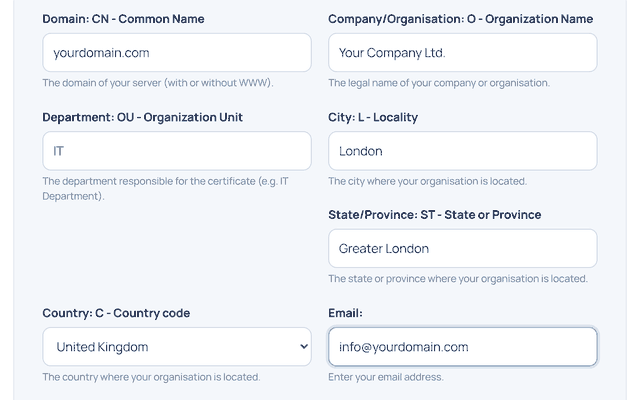
- Click Generate CSR. Paste the CSR into your certificate order and save the private key somewhere safe.
You can view the contents of an existing CSR with the CSR Decoder.
Need help? Open a support ticket from your client area or call +90 216 348 35 03.








